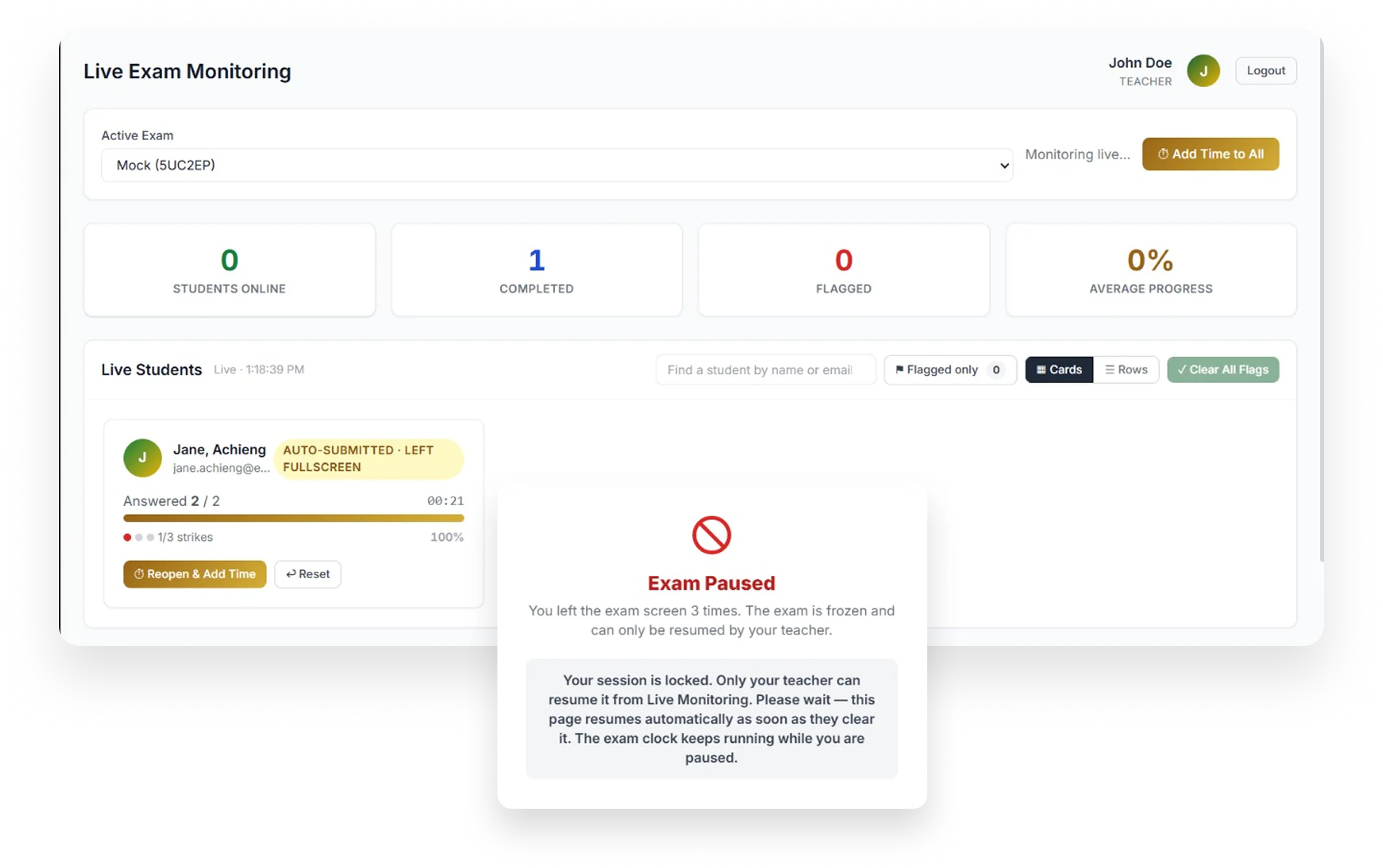
Why educators trust Mock
Built for schools and teachers who take exams seriously.
-
Monitored
Live tab-tracking, strict timers, and strike warnings keep every exam transparent.
-
Optimized
Automatic grading for objective questions and instant reporting save you hours of marking.
-
Compliant
Answer keys never reach the student's browser, and marking happens securely on our servers.
-
Kernel
A reliable core engine that keeps exams running smoothly, even with a full class online.
How it works
-
Create your exam
Add questions, set the timer, and choose your security rules.
-
Share the exam code
Students join from any browser with a simple code.
-
Monitor and get results
Watch the exam live and receive results as soon as it ends.
Everything an exam needs, in one place
From the first question to the final mark.
-
Watch the exam live
See every student's progress as they work. Leaving the exam window or full screen gives a strike, and three strikes pause the exam until you decide.
-
Marks that save you time
Multiple choice, checkboxes, maths and code are marked the moment a student submits. Written answers can be marked by AI from your marking guide, and you can review and change every mark.
-
Six kinds of question
Multiple choice, checkboxes, written, mathematics, coding and accounting, each marked the way that subject needs.
-
Build from a PDF or a prompt
Describe the exam or upload a PDF and get a draft to edit. AI drafts are always yours to check before students see them.
-
Fair when things go wrong
Answers save as students type and the clock runs on our servers. If the power fails, reopen the student and give back the time they lost.
-
Results, your way
Email results to students, read class analytics and export to Excel. You choose whether students see their score straight away.
Fits the systems your school already uses
Students open exams from your course system or your own software. Nobody types an exam code, and nobody uploads a class list by hand.
Your course system
Mock uses LTI 1.3, the standard behind Moodle, Canvas, Blackboard and D2L Brightspace. A teacher adds Mock to a course like any other activity. Students open the exam from there, and their marks go back to the gradebook.
Setup guides for Moodle and CanvasYour own software
A simple API for schools with their own systems. Add students, open an exam for a student with a one-time link, read results, and receive signed webhooks when marks are final.
Read the API documentationCourse system and API connections are part of School plans.
Built for whole schools
One School Head account brings your teachers together.
- Invite your teachers, or let them join with a school code, and see their exams, results and analytics in one place.
- Share school credits for grading and AI marking across your teachers.
- Teachers keep their own classes, exams and students, and each teacher sees only their own.
- Connect your course system or your own software so students open exams without typing codes.
Start free. Pay when you need more.
Teachers start free. Add credits or choose a school plan when you need them, and pay by card or M-Pesa. Prices are in Kenyan shillings; if your card is in another currency, your bank converts the amount.
Questions teachers ask
Do students need to install anything?
No. Students open Mock in a web browser on a laptop or desktop computer and join with an exam code from their teacher, or through your course system. Phones are not supported for sitting an exam.
What does Mock watch for during an exam?
Mock notices when a student leaves the exam window or full screen. Each time is a strike, and at three strikes the exam pauses until the teacher decides what to do. Teachers see all of this live, in one place.
What happens if the power or internet goes out?
Answers are saved as students work, and the exam clock is kept on our servers. The teacher can reopen the student, and the time lost while they were away can be added back.
How does marking work?
Multiple choice, checkboxes, maths and coding answers are marked automatically. Written answers can be marked by AI using the marking guide you give, or you can mark them yourself. AI can make mistakes, so you can review and change any mark.
Who can see my students' answers and data?
Each teacher sees only their own students and exams, and answer keys never reach a student's browser. Our Privacy Policy explains what we collect and why, and the rights you have under the Kenya Data Protection Act, GDPR and CCPA.
Can we connect Moodle, Canvas or our own system?
Yes. Mock supports LTI 1.3 for Moodle, Canvas, Blackboard and D2L Brightspace, and has an API for your own software. Both are part of School plans. See the setup guides and the API documentation.
What does it cost?
Teachers can start free. When you need more credits, or a plan for your whole school, you can pay by card or M-Pesa. Prices are shown in Kenyan shillings after you sign in, and if your card is in another currency your bank converts the amount.